目录
前言
Filebeat 是 Elastic Stack 里专门用来采集日志,并发送到后端的轻量级日志采集器。
它的核心作用是:从服务器上读取日志文件,然后把日志发送到集中日志系统:
- 监控日志文件(如
/var/log/*.log) - 读取新增日志
- 进行简单解析
- 发送到日志系统
安装
添加 GPG key:
wget -qO - https://artifacts.elastic.co/GPG-KEY-elasticsearch | sudo gpg --dearmor -o /usr/share/keyrings/elastic-keyring.gpg
添加 apt 源:
echo "deb [signed-by=/usr/share/keyrings/elastic-keyring.gpg] https://artifacts.elastic.co/packages/8.x/apt stable main" | sudo tee /etc/apt/sources.list.d/elastic-8.x.list
安装:
sudo apt update
sudo apt install filebeat -y
启动:
sudo systemctl daemon-reload
sudo systemctl enable filebeat
sudo systemctl start filebeat
配置
内置模块
Filebeat 内置了一些常见服务的模块,比如 system、Nginx,可以通过以下命令查看:
sudo filebeat modules list
比如,启动 system 模块:
sudo filebeat modules enable system
配置 system module:
sudo vim /etc/filebeat/modules.d/system.yml
内容如下:
- module: system
  # Syslog
  syslog:
    enabled: true

    # Set custom paths for the log files. If left empty,
    # Filebeat will choose the paths depending on your OS.
    #var.paths:

    # Use journald to collect system logs
    var.use_journald: true

  # Authorization logs
  auth:
    enabled: true

    # Set custom paths for the log files. If left empty,
    # Filebeat will choose the paths depending on your OS.
    #var.paths:

    # Use journald to collect auth logs
    var.use_journald: true
system module 默认采集:
/var/log/syslog/var/log/auth.log
我用的是 debian13,使用的是 journald,所以这里 var.use_journald 要改为 true。
启动 Nginx 模块步骤和 system 类似:
sudo filebeat modules enable nginx
配置 Nginx 模块:
- module: nginx
  # Access logs
  access:
    enabled: true

    # Set custom paths for the log files. If left empty,
    # Filebeat will choose the paths depending on your OS.
    #var.paths:

  # Error logs
  error:
    enabled: true

    # Set custom paths for the log files. If left empty,
    # Filebeat will choose the paths depending on your OS.
    #var.paths:

  # Ingress-nginx controller logs. This is disabled by default. It could be used in Kubernetes environments to parse ingress-nginx logs
  ingress_controller:
    enabled: false

    # Set custom paths for the log files. If left empty,
    # Filebeat will choose the paths depending on your OS.
    #var.paths:
配置好后,重启 Filebeat 服务:
sudo systemctl restart filebeat
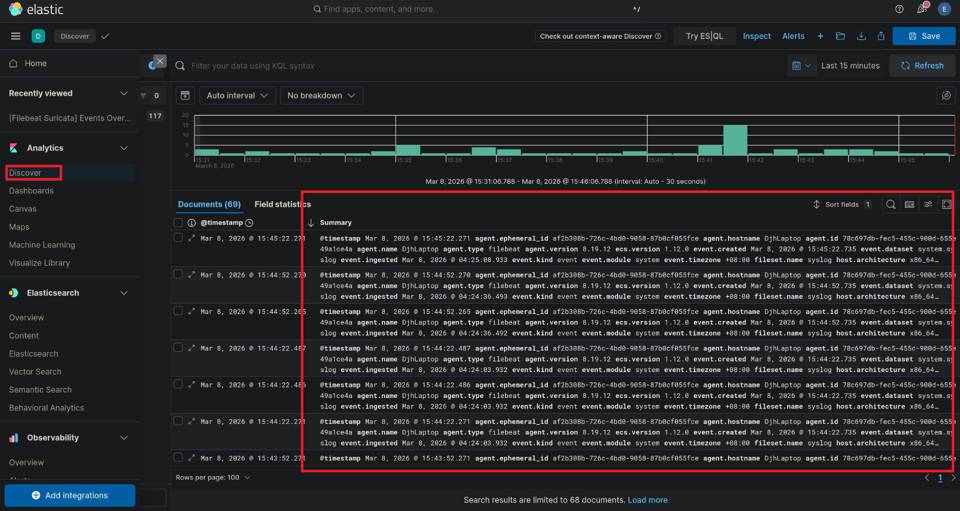
如果 system 和 Nginx 的日志成功导入了 ES,那么可以看到 ES 应该是有 Filebeat 的 datastream 的。
通过 /_cat/indices?v 可以看到:
yellow open .ds-filebeat-8.19.12-2026.03.07-000001 WmKwYxg2Q8KJ7rhqJOFJKQ 1 1 5120311 0 794.1mb 794.1mb 794.1mb
在 kibana 的 discover 页面可以开始检索和可视化日志记录。